Remember when I said that you wouldn’t usually generate and manage translation files yourself? The reason for that is the fact that you will most likely want to host your themes or plugins in the wordpress.org theme or plugin repositories. If you do that, you can benefit from the translate.wordpress.org system.
This is an open, community-driven translation platform for all WordPress projects hosted on wordpress.org, including the WordPress core itself. It uses GlotPress under the hood, which is literally just a WordPress plugin. You can even download it on your own website and make your own collaborative translation platform.
The two most important user roles in this system are Contributor and Translation Editor. Anybody with a wordpress.org account can be a contributor. An editor is a trusted person responsible for approving translation suggestions made by contributors. Here is what this system looks like on the frontend for a contributor (translating the Query Monitor plugin):
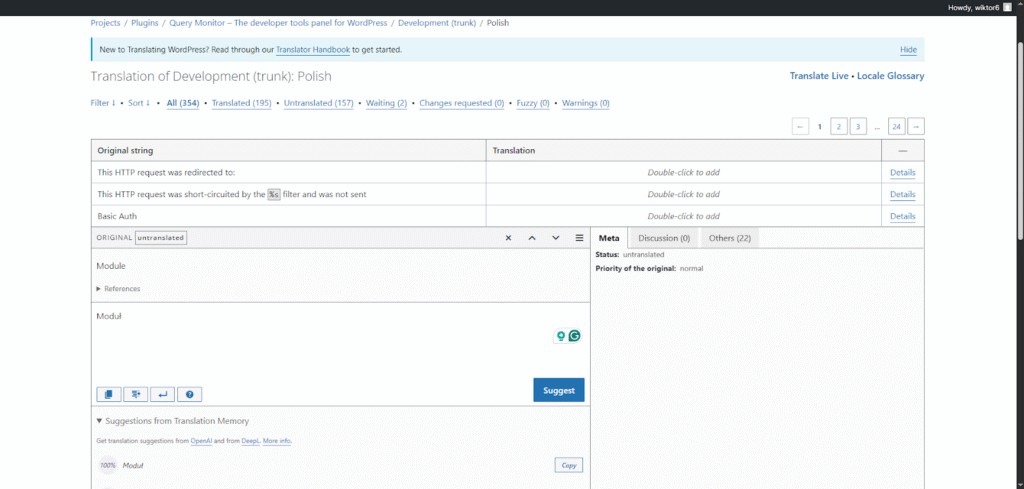
What this means for you as a plugin/theme developer is that you theoretically don’t have to pay a translator. Now, whether or not someone will actually be interested in translating your project is another question.
How It Works
One of the greatest blessings of this system is that you don’t have to care about the l10n files at all. They are all automatically generated for you. The moment you upload your theme/plugin to the repository, the POT file is created by the system and contributors can translate it using the UI you just saw. Your only responsibility as a developer is internationalizing your code. You don’t even have to include the ‘Domain Path’ header or call load_plugin_textdomain().
When you download a plugin in your admin dashboard, WordPress will automatically download the necessary translation files. It will only download files that are actually needed. This means that if your website is in English, no translations will be downloaded. But as soon as you change it to Polish, WordPress will automatically download all available translations for all your plugins and themes.
Another big change is where these translations are stored. They are not placed in the plugin’s/theme’s directory. They are placed in the /wp-content/languages directory. This folder contains all core translations, and it also has “plugins” and “themes” subdirectories.
Note that for a localization file to be automatically installed by WordPress from translate.wordpress.org, the translation has to be at least 90% complete. If your translations are only 50% done for a given locale, the files will not be downloaded, and your strings will be displayed in English.