Custom fields are just post metadata. There’s nothing more to it. This metadata is stored in the wp_postmeta table in the database. It’s a one-to-many relationship, meaning a single post can have multiple custom fields. This provides nearly limitless possibilities. It serves as a more structured content, allowing you to store information such as product price, product stock, the number of pages a book has, or even what type of layout should be used on the page.
There’s an important distinction to be made between the 2 main terms – custom fields and meta boxes. A custom field is the more abstract concept of metadata stored for a post. A meta box is the actual HTML form element rendered in the post editor. It’s the input allowing the post author to fill the custom field with data.
You could add metadata to your posts with PHP using functions like add_post_meta() or update_post_meta(). This would create a key-value pair in the wp_postmeta table with whatever key and value you supplied to the function. That would be a valid way of adding metadata if you wanted to control it using only code. But that’s usually not the case. Instead, you want the post authors to be able to specify the data for each post. That’s when you need to create a meta box.
Creating A Custom Field & Saving The Metadata
To create a custom meta box, you have to use the add_meta_box() function. You specify its ID, title, content callback, and the post type(s) for which the meta box is to be displayed. The callback is responsible for rendering the HTML of the meta box. Let’s add an “Author Name” meta box to our book post type:
// DON'T USE IN PRODUCTION (NOT SECURE)
function thm_book_author_name_html( $post ) {
	// You'll understand this later
	$value = get_post_meta( $post->ID, '_thm_author_name', true );

	?>
	<label for="thm_author_name_field">Author Name</label>
	<input type="text" name="thm_author_name_field" id="thm_author_name_field" value="<?php echo $value ?>">
	<?php
}

function thm_add_custom_box() {
	add_meta_box(
		'thm_book_author_name', // Unique ID
		'Author Meta Box Title', // Box title
		'thm_book_author_name_html', // Content callback, must be of type callable
		'book', // Post type
	);
}
add_action( 'add_meta_boxes', 'thm_add_custom_box' );And here’s what it looks like in the post editor. It shows up at the very bottom of the page. You could also reorder meta boxes with the up and down arrows if you had more of them, or place them in the Inspector sidebar on the right. You could also place multiple <input> elements under the same meta box.

That’s working, but if you tried to input the author’s name and saved the post, you would see it didn’t get saved. And no wonder – we haven’t written any code to save it yet! To do that, we need to create a PHP function and hook it into some action executed after the post is saved (usually save_post).
The input to the meta box is sent along with all the other post data in a POST request when the user saves the post. There’s no special treatment for meta boxes. It works as if the entire post were one huge <form> element. This means we have to dig through the payload, read the data, and save it in the database.
// DON'T USE IN PRODUCTION (NOT SECURE)
function thm_save_cf_book_author_name( $post_id ) {
	if ( array_key_exists( 'thm_author_name_field', $_POST ) ) {
		update_post_meta(
			$post_id,
			'_thm_author_name',
			$_POST['thm_author_name_field']
		);
	}
}
add_action( 'save_post', 'thm_save_cf_book_author_name' );This function searches the global $_POST array for the key ‘thm_author_name_field’ (which is the name of our meta box’s input element). It then updates the entry in wp_postmeta with key ‘_thm_author_name’ and the user-supplied value for the saved post.
The function update_post_meta() is usually preferred over add_post_meta() as it updates the value if the key already exists, and creates it if the key is not present. add_post_meta() always adds a new entry. This means you would have 10 values associated with ‘_thm_author_name’ if you saved the post 10 times (yes, a single meta key can have multiple meta values).
The above example is theoretically all you need to add a custom field to a post. However, you should not use it in production. It lacks sanitization and other security checks. It’s also incredibly simple, as we only needed a text input field. But what if you needed a date picker or an image gallery? That’s where practice meets theory.
The Reality Of Custom Fields
In practice, coding custom fields (and custom meta boxes) is done only by theme and plugin developers. If you were to create a website for a client, you’d almost never write your meta boxes. It’s too tedious, complicated, and error-prone. And most importantly – it’s reinventing the wheel.
There are many plugins that solve this exact problem. One of the most loved and popular is Advanced Custom Fields (ACF). It’s a commercial plugin, but you’ll see it mentioned by professional WordPress developers all the time. As a matter of fact, it’s so popular that in 2024 it got hijacked by WordPress’s mother company Automattic, when Matt Mullenweg made an idiot of himself trying to extort $32M from WP Engine.
This is not a tutorial on ACF, so I’m not going to explain it. The bottom line is that it takes care of creating those custom fields for you, with over 30 native field types (meta box inputs) available, including advanced ones like files, images, date pickers, etc.
Using Metadata In Templates
You’ve created your custom fields. Now you want to use or display them in your templates. How do you do that? By calling get_post_meta( $post_id, $key, $single ). $post_id is self-explanatory. $key is the meta_key you want to retrieve. $single is a boolean value. If true, it returns only the first value associated with the specified key. If false (default), it returns an array of values (no matter how many there are).
If you were using a plugin for custom fields, you’d usually use its specific functions. For example, ACF provides the get_field() and the_field() functions. These functions take care of formatting the data for you. If you were to do get_post_meta() directly on a date picker field, you’d get a value like ‘20250809’.
The Native Custom Fields Tab In The Editor
Throughout this entire section, we’ve been talking about creating custom meta boxes when adding custom fields. You might be surprised to hear that the WordPress editor has a native way of adding and modifying metadata. I’m covering it at the very end because the truth is that it’s very obscure and not user-friendly.
To show the “Custom Fields” tab in the Block Editor, you have to navigate to the three dots > Preferences, and under General > Advanced, switch “Custom Fields” on. After refreshing the page, you’ll see a “Custom Fields” area appear at the bottom of the editor.
This area displays all non-hidden metadata for the post. The problem is that it’s only a text field, and there are no other field types. The user can mess with the meta_key, which is not good, and the general user experience is horrible. This option is not viable for websites where the person using it is not a developer or where there are advanced fields needed. You can see what I’m talking about in the screenshot below.
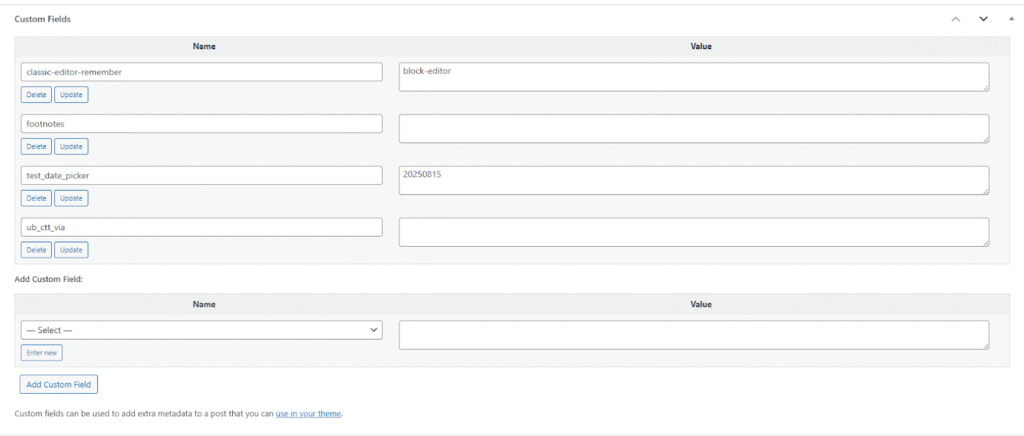
As you can see, there are a couple of fields added for this post. The classic-editor-remember was added by the Classic Editor plugin to save the editor preference for this post. The test_date_picker was added by me with ACF, and you can see the value format I was talking about. By the way, I’ve disabled ACF before taking that screenshot, and you can see the data in the wp_postmeta table is still there (as it should).
Why did I say “it displays all non-hidden metadata”? Are there hidden metadata? The answer is yes. Look back at my code example from the beginning of this section for our Author Name custom field. Then look back at the screenshot above. It’s not there. I’ll give you a moment to figure out why… Ready?
Metadata for which the key starts with an underscore is considered hidden. It’s like dotfiles in Linux. These fields are hidden from the Custom Fields area in the editor (and from the the_meta() function, but that’s deprecated anyway).