Block Styles
Plugin and theme authors can create custom styles for existing blocks. When a block has block styles registered, they appear as options in the right sidebar of the block editor. Block styles are registered either in PHP using register_block_style() or in JavaScript using registerBlockStyle(). Server-side registration is the standard. Let’s register a “Rounded” style for the core button block:
function my_theme_register_block_styles() {
	register_block_style( 'core/button', array(
		'name'	     => 'rounded',
		'label'      => 'Rounded',
		'is_default' => false
	) );
}
add_action( 'init', 'my_theme_register_block_styles' );The effect of this function is that the block’s wrapper will have an ‘is-style-{name}’ class added to it, so for us it’ll be ‘is-style-rounded’. The style author is then responsible for styling this class and loading the CSS in the editor and on the frontend. This can be achieved in many ways, such as using style.css, theme.json, inline CSS, wp_enqueue_block_style(), and more.
Block Variations
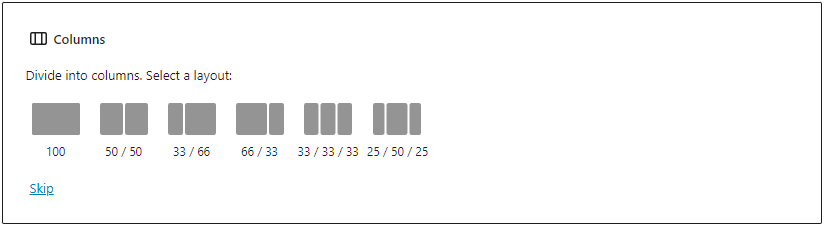
Block variations allow block developers to provide pre-configured versions of a block. The perfect example is the Columns block. When you insert this block, you get to choose a variation such as: 100, 50/50, 33/33/33, etc. Block variations are not their own blocks. They are a set of attributes to be automatically applied to the block the variation is created for. Variations are registered in the editor using the registerBlockVariation() function.