How do you display some dynamic content with a static block? Like a custom field or the user’s name? You can’t. You have to develop a full dynamic block, just for this silly little functionality. Yet, your custom block will literally just be a <p> element with dynamic text. It’s so frustrating to have to do that. The core paragraph block already exists! If only we could somehow connect this block with the dynamic data. That would be neat, wouldn’t it? Well, we can…
The block bindings API, introduced in WordPress 6.5, is one of the most, if not the most, revolutionary features since the introduction of the Block Editor. It allows you to connect blocks with dynamic data endpoints called sources. With block bindings, you no longer have to create a dynamic block to display dynamic data. We’ve already mentioned this API when discussing pattern overrides.
Displaying Custom Fields
Let’s understand how this API works by looking at the first core way of using it – displaying post metadata.
To get a good grasp of it, we need to start by explaining some key concepts. The API is supported only by a few core blocks. There are plans for expanding that support and allowing custom blocks to support it. Only specific attributes of those blocks can be bound to data sources.
Here’s a list of blocks along with compatible attributes that supported the API when it first got released:
- Paragraph – content
- Heading – content
- Image – url, alt, title
- Button – url, text, linkTarget, rel
These may seem underwhelming, but you can still achieve a lot with just this solid baseline. Imagine using the image, heading, and paragraph blocks, to create a section displaying information about a book’s author – all from the metadata.
A data source is just a callback function. This was originally a PHP function, but it can also be a JavaScript function since WordPress 6.7. This function is responsible for returning the data to be used in the attribute it is bound to. The actual binding happens by adding an attribute to the block’s delimiter.
Alright, we covered the foundation, it’s time to see how it really works. It makes the most sense to start with a code example and explain it later. Here’s a paragraph block with its content attribute bound to the thm_author_name custom field (expanded for readability):
<!-- wp:paragraph {
	"metadata":{
		"bindings":{
			"content":{
				"source":"core/post-meta",
				"args":{
					"key":"thm_author_name"
				}
			}
		}
	}
} -->
<p>Fallback text</p>
<!-- /wp:paragraph →“content” is the attribute we’re binding. For an image, it could be url, alt, or title. “source” is the registered name of the data source. In this case it’s the core post meta. The “args” key houses an array of arguments that will be passed to the callback function. The callback’s author gets to choose what arguments they are expecting. For core/post-meta, the most important argument is “key”.
You can also see there’s some fallback text inside the static <p>. This text will be rendered if the callback doesn’t return a value. It’s good practice to think about what your block should display if the meta key doesn’t exist. That’s it. This paragraph will now display whatever meta_value is associated with the thm_author_name meta key.
It’s important to note two things. First, a meta key has to be registered using the register_meta() function with args single => true and show_in_rest => true. Second, a meta key can’t be hidden – that is, it can’t start with an underscore. If one of those prerequisites is not met, the binding will not work.
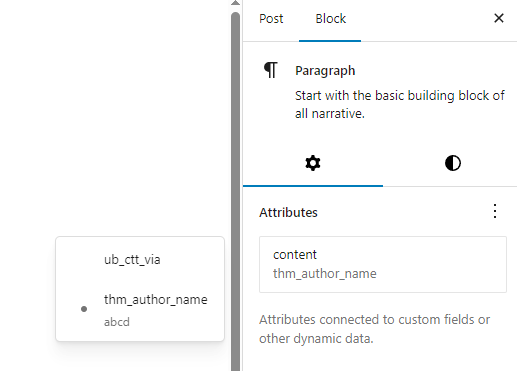
It used to be the case that you could only create the binding using the code editor. This is no longer true, as WordPress provides a built-in “Attributes” field for blocks supporting block bindings, allowing you to create a binding in the visual editor.
Custom Sources
The number of available core sources will grow as the Block Bindings API matures. As of writing, it’s in its infancy, so there is a big chance you will need a custom data source. Thankfully, that’s not a problem. You can register your own sources and do whatever you like in their callbacks.
To register a custom source in PHP, you have to use the register_block_bindings_source() function. This function expects 2 parameters – $source_name and $source_properties. The name has to follow the namespace/name convention. $source_properties is an array of arguments.
The available arguments are:
- label
- get_value_callback
- uses_context
‘label’ is self-explanatory. ‘get_value_callback’ is the callback function for this source. We’ll cover ‘uses_context’ later.
The callback’s signature is:
function( array $source_args, WP_Block $block_instance, string $attribute_name )
- $source_args is the array of arguments specified in the metadata.bindings.$attribute.args. The core/post-meta would do $source_args[‘key’] to read the key.
- $block_instance is the WP_Block instance of the bound block for which the callback is being executed.
- $attribute_name is the name of the bound attribute. It would be “content” in our previous example.
Let’s register a source to see how it works. We’ll create a thm/date source, which is going to return the current date and time formatted according to our specification.
function thm_date_source_callback( $source_args ) {
	if ( isset( $source_args['format'] ) ) {
	     return date( $source_args['format'] );
	}
}

function thm_register_source() {
	register_block_bindings_source(
		'thm/date',
		array(
			'label'		   => 'Current date',
			'get_value_callback' => 'thm_date_source_callback',
		)
	);
}
add_action( 'init', 'thm_register_source' );And here’s what the paragraph block displaying that date looks like:
<!-- wp:paragraph {
	"metadata":{
		"bindings":{
			"content":{
				"source":"thm/date",
				"args":{
					"format":"Y-m-d H:i:s"
				}
			}
		}
	}
} -->
<p></p>
<!-- /wp:paragraph -->Well that was easy. Compare that to having to create a full custom dynamic block. Do you see why I said this API was the most significant update to the Block Editor so far? That being said, you can’t edit custom sources in the visual editor (yet). I had to add these attributes manually in the block’s markup using the code editor.
Context
The Block Context API is not specific to block bindings, but it doesn’t really call for a top-level section of its own. It’s a rather niche and advanced topic, but it’s invaluable when presented with specific requirements. Don’t worry if you don’t fully understand it from this explanation alone.
When you’re creating a template, the code in that template is executed in a certain context. Let’s say we’re viewing a single blog post. The code in that template operates in the context of that post. The title in this context is of that post. The ID is of that post. The content to be displayed is of that post. This is a very high-level context, encapsulating all of the code and elements on this page.
Now think smaller. Think about the individual blocks you place on your page. What if you wanted to display a list of related articles, and in that list you wanted to display the title and excerpt of other posts. It doesn’t make sense to have to create new functionality for rendering the same data but for a different post. Instead, it makes more sense to change the context.
The Context API allows you to do that. It’s based on the React Context API. A block can specify context it wants to pass to its children using the providesContext attribute in block.json. Similarly, children can specify contexts they are actively listening for using the usesContext attribute. A block like that will get access to these contexts if any of its parents, no matter how far away in the hierarchy, provides that context.
What does it look like in reality? Well, in the editScript JS file for the block, you can accept a context parameter in the edit function, and then use it like context[‘postId’], assuming the name of the context is postId. Similarly, WP_Block PHP objects have a context property, making it possible for you to use this context by doing $block->context[‘postId’]. It’s just an associative array of all contexts the block opted to accept and that have been passed by some parent.
A loop block can choose to provide the postId context. A context is usually linked to a block’s attribute. It can then modify its postId attribute to something different, perhaps the ID of a related post it is currently displaying. All of the blocks inside of that loop listening for the postId context would then be able to use the new ID.
I’m avoiding directly referencing the Query Loop as I haven’t introduced it yet, but if you know what that is – that’s what I’ve been referring to the entire prior paragraph. Don’t worry if you don’t know what that is. You will soon.
But what the hell does that have to do with block binding? Well, remember the mysterious ‘uses_context’ argument available when registering custom data sources? That’s it. It’s an array of contexts’ names. All of the contexts you specify here will be listened for by blocks which use this binding. This will then make the contexts available in the WP_Block $block_instance object passed as the second parameter to your callback.